Tilt Angle
Introduction
This topic will explain the Tilt angle option, describe where to find it, and provide an example.
Tilt Angle
The Tilt angle is an angle that is additional to the defined tool axis tilting. For example, when using the tilting strategy Tilted Through Curve, the tool axis is aligned with the tilt curve at each position along the surface. The Tilt Angle is then in addition to this tool axis orientation.
Navigation
To access the Tilt angle:
- In the Tool axis control page, set the Tool axis will... option to:
- Tilted with the angle
- Tilted with fixed angle to axis
- Tilted through point
- Tilted through curve
- Tilted from point away
- Tilted from curve away
With one of these options selected, you will notice Tilt angle as one of the options below.
Example
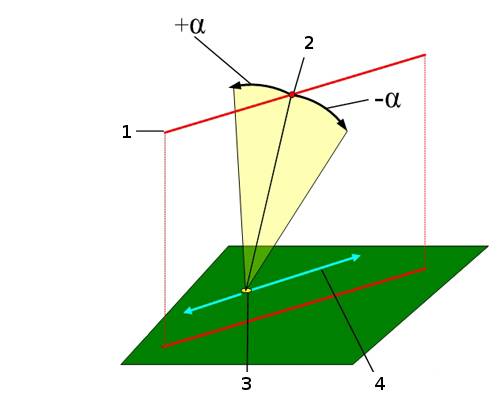
Tilt Angle - tilts the tool axis center line away from the tilt curve (1). The direction is defined along a plane that is spanned by the curve point (2), the surface point (3), and the direction from the curve to the surface point. (This plane is shown in yellow.)
-
For positive tilt angles, the tool tilts outwards away from the curve and towards the moving direction.
-
For negative tilt angles, the tool tilts inwards toward the curve and away from the moving direction.